


March 16, 2026
- Improved the loading experience in an AI component when waiting for an AI skill to execute.
- Automatically detecting the language of the user and offering to switch the conversation language is now a default AI skill which you can switch on/off and edit.
- When a user manually switches the language in a component, a hidden log will be added to show this.
- Team assistant will now always switch topics when answering a ticket, even if a topic was manually selected before.
- Created personal user-connected API keys for the team assistant for added security.
- New login system with support for passwordless authentication and passkeys, including a redesigned welcome email.
- You can now test your AI for ticket topics as well.
March 9, 2026
- You can now find default skills that can easily be switched on/off in your account. (If you have suggestions for a default skill, please let us know.) Optionally, you can add custom skills that are specific to your business needs.
- Deleting most asked questions from insights wasn’t working. This has been fixed.
- When a sitemap XML file is uploaded, it now keeps the original name. It is possible to rename the resource collection later if needed.
- Several errors have been fixed.
- The conversation titles and summaries generated by AI will be in the language of the conversation.
- S3 data exports now also contain conversation data.
March 2, 2026
- Live-chat messages and AI messages will be shown within the same view. They are rendered differently (tabs vs inline) so it will be easy to distinguish. This change will allow for continuity in the user experience and the livechat transcript will be available in the Unless chat so that customers can view it and refer back to it.
- We've added a new security check icon to user details and conversation details views. You can find more information here.
- It is now possible to add related questions when uploading a CSV. Simply add extra columns (in addition to the required title + description) titled "related_question_1", "related_question_2", ... We support up to 10 per row.
- Clarified customer metadata in the AI prompt to avoid confusion in answers.
- Improved the prompt for knowledge suggestion tasks that are based on live-chat answers.
- Improved error handling and stability.
- In the weekly account summary (in Slack), frequently asked questions are now de-duplicated.
Bug fixes:
- Changing the density of the conversation list no longer results in white space below.
- When in a topic, an arrow back button has been added to allow going back to global.
- The configured pre-AI-skill message is now shown on top (instead of in a message).
- The “image sent” message in live-chat mode is now put in the live chat conversation (instead of the AI conversation).
February 23, 2026
- ⚙️ Salesforce Team Assistant integration 🎉
- Use cases will now have a default "team assistant" audience.
- Notification messages (ie, after a thumbs up, an API action like contact support, etc.) were not visible in the large conversation center view. This has been fixed.
- Bug fix regarding quality scoring of resources.
February 16, 2026
- Use cases renamed to workspaces.
- Topics in test workspaces don’t count towards the topic limit in your account.
- Improved the prompt for auto-suggested follow-up questions.
February 9, 2026
- Live chat sessions will be automatically closed after 24 hours of inactivity.
- New Guardrails tab available when editing AI skills. (& Triggers have been renamed to Guidance.)
- You can now connect secured traits to use as action variables in your MCP/API skills.
- Fixed a bug regarding starter AI skills not showing when there's an audience restriction (and the user is in the audience).
February 2, 2026
- Agent actions renamed to AI skills.
- Agentic triggers are now available for AI skills. Simply type what the AI should do and when it is needed. Being clear and specific is always good. You can also add custom rules and example questions.
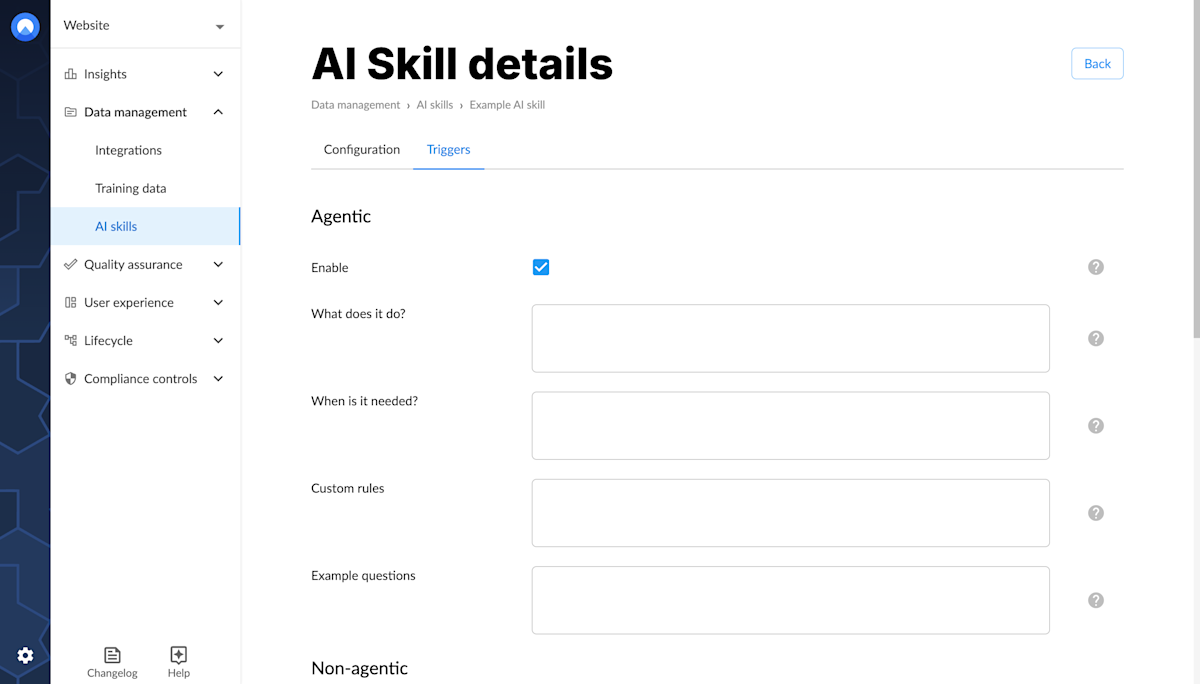
- New AI skill: Try again in another topic. This is intended for the Team Assistant. This way, if the support agent asks a question and the AI can't answer because it doesn't have the information in the sources, then an action can be provided to look into the ticket sources as well for answers.
- Choose to enable an AI skill for specific audiences (vs. for everyone) under advanced triggers.
- Create a knowledge suggestion task directly from the conversation details view.
- Secure user identification verification added. Find more information here.
- Workflows renamed to Lifecycle (stages).
- Adjusted the language logic to first check the page language before going through the rest of the conditions. This allows you to support multiple languages while still getting the AI to open in a certain language the first time.
- The disclaimer message will be translated according to the language logic.
- A title is generated asynchronously for each conversation (5 minutes after the last question in that conversation). This generated title will be included in the exports and be shown in the AI component’s recent conversations list.
January 26, 2026
- Text-to-speech functionality is now available! 🔊 This means your endusers can now listen to the responses provided by the AI.
- The setting for starter message language has been removed. The starting message will use the language of the UI.
- If the user selects a language in the team assistant, that selection will be remembered.
- If you select an origin filter on the Insights page, that selection will be remembered.
- Number of questions added as a filter to the conversations list view.
- Multiple improvements and fixes regarding language handling as well as conversation tags.
- A new page has been added for managing conversation tags. Here you can add, rename and delete them.
January 19, 2026
- Conversation export now includes additional fields: title, visitor ID/email, escalated
- Bug fixes related to language handling
- UI improvements such as a floating input field for AI component
January 12, 2026
- We have just added speech-to-text functionality! 🎙️ Your endusers can now click the microphone icon to dictate their questions. You can enable/disable this feature from the AI editor (Layout -> enable voice input).
- In Freshchat, you can now send an image by copy-pasting it directly into the message field as well.
January 5, 2026
- You can now generate answers based on similar tickets in the Unless dashboard.
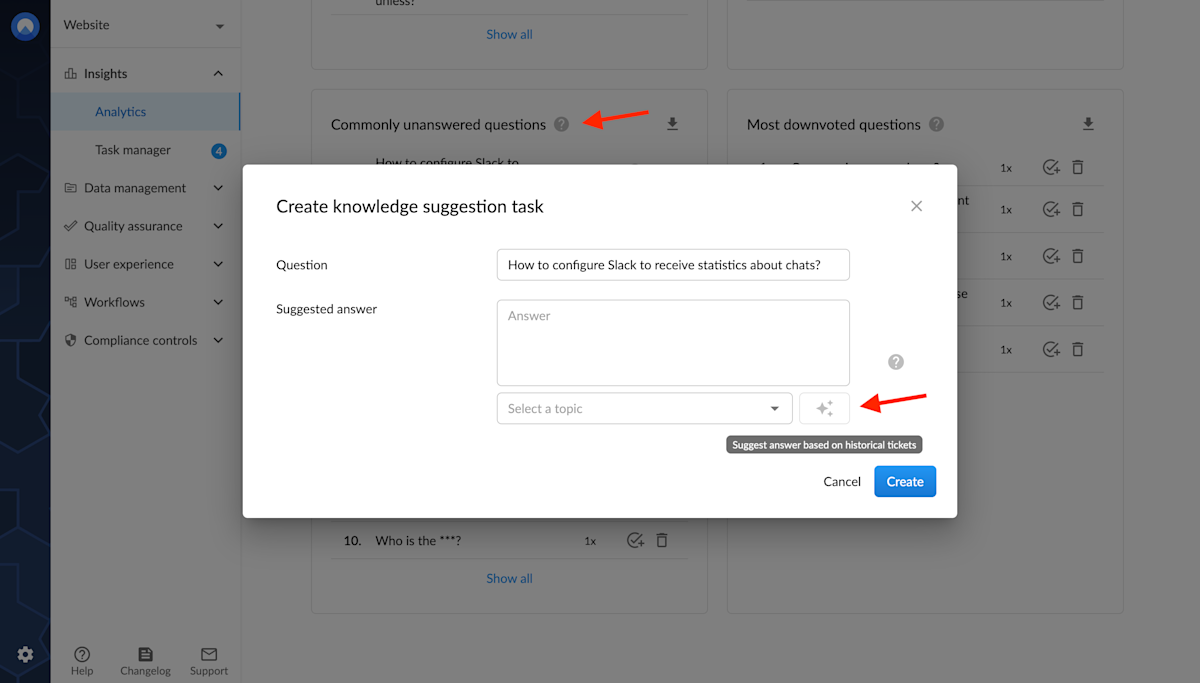
- You can also generate answers based on similar tickets in the team assistant. (This currently only works for Hubspot tickets. If you use a different CRM and are interested in this feature, let your account manager know.)
- Conversation analysis is now available for API conversations too.
- We've improved the UI to show more clearly when an action is being processed with a loading indicator (spinner).
- The icons on the top bar have been moved to the menu in the bottom bar. We've also added the option to start a new conversation from the menu.
- The legacy search view in component has been removed. Everyone should already have been switched to the ‘inline search tab’. If that wasn't the case, it can be enabled via the AI component settings.